We usually backup contacts, SMS, application settings, everything whenever we update the device firmware. Apple iPhone users use iTunes software for backing up data when the iOS version is upgraded to a new one. However, it becomes really tough when the iPhone is jailbroken or unlocked. The unlock and its settings would go away when we use iTunes as the primary backup source. Here comes the use of iSafecopy. It is a free backup software for the unlocked iPhone.
Backup software for unlocked iPhone:
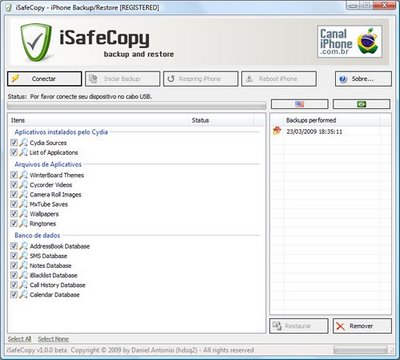
Download iSafeCopy here, and backup your iPhone.
Connect iPhone to your Windows computer and open the iSafeCopy application. Select the things you want to backup. Here is a list of iPhone files that we can back up with iSafeCopy .
Cydia sources (Unlocked iPhone)
Settings of the Cydia apps.
Contacts data in the address book.
SMS.
Full Call History.
iPhone Calender data, themes and other settings.
This application interface is designed in Brazilian but you can select English from the top tabs.
Anonymous says
Link broken